Maintenance Complete – Service Restored – Nodes Upgraded
Monero mining guide 2026 — how to mine XMR with CPU, solo and in a pool

Monero Mining Guide 2026: How to Mine XMR Solo and in a Pool

Guideline for mining XMR Monero 2026 — CPU mining, RandomX, pool setup and wallet storage

By XMRWallet Team  ·  Published  ·  7 min read

Monero (XMR) is the leading privacy coin in the cryptocurrency space — built from the ground up with mandatory default-on privacy for every transaction. Ring signatures, RingCT, and stealth addresses together ensure that sender identities, recipient identities, and transaction amounts are all concealed from outside observers. This makes XMR fundamentally different from Bitcoin, where all transaction data is permanently public.

The two most common ways to acquire Monero are purchasing it on an exchange and mining it. This guide covers mining — from understanding why Monero's mining approach is unique to step-by-step instructions for both solo mining and pool mining.

What Is Cryptocurrency Mining?

Mining is the process by which new transactions are validated and added to the blockchain. Miners run software that uses computational power to solve cryptographic puzzles — the first to find a valid solution gets to add the next block and receives a block reward in XMR. This process is called proof-of-work (PoW). Mining serves two functions simultaneously: it creates new XMR (keeping the network economically incentivized) and validates the integrity of all transactions (preventing double-spending).

A new Monero block is mined approximately every two minutes. Monero has a smooth emission schedule with a tail emission — after the main emission curve concludes, miners continue to receive a small, fixed block subsidy indefinitely, ensuring network security in perpetuity. Current block reward information is available at CoinWarz.

Why Monero Mining Is Different: RandomX

Most cryptocurrencies are dominated by ASIC (Application-Specific Integrated Circuit) mining hardware — specialized machines costing thousands of dollars that are orders of magnitude more efficient than general-purpose CPUs. This leads to mining centralization: the network is controlled by whoever can afford the most ASICs.

Monero uses the RandomX proof-of-work algorithm, specifically designed to be efficient on general-purpose CPUs and resistant to ASIC mining. RandomX achieves this by using random code execution and memory-hard operations that favor CPUs with large, fast caches — exactly what modern consumer CPUs are optimized for. This keeps Monero mining genuinely accessible to ordinary computer users. Technical documentation: RandomX on GitHub.

Solo Mining vs Pool Mining

Before starting, decide between solo mining and pool mining:

  • Solo mining: You mine independently. If you find a block, you keep the entire block reward. With a single CPU, this can take an extremely long time — months or years — between successful blocks. Suitable for miners with significant hash rate or those willing to accept very infrequent payouts.
  • Pool mining: A group of miners combine their hash rate to find blocks more frequently and split rewards proportionally. Produces smaller but much more frequent and predictable payouts. The practical choice for most home miners.

The Monero community strongly encourages miners to support decentralization by using smaller pools or p2pool — Monero's decentralized peer-to-peer mining pool with zero fees and no central operator. Avoid pools that already hold more than 10% of total network hash rate.

Step 1: Set Up a Monero Wallet First

Before starting to mine, you need a wallet address to receive your earnings. XMRWallet is free, open-source, and browser-based — no software to download, no registration. Visit xmrwallet.com, click "Create XMR Wallet," and write down your 25-word seed phrase on paper immediately. Store it securely offline. Click "Receive" to find your wallet address — you will need this when configuring your mining software.

Step 2: Download Mining Software

XMRig is the most widely used and actively maintained Monero mining application, available for Windows, Linux, and macOS. Always download from the official GitHub repository — never from third-party sites or links in messages, as modified versions may contain malware.

Solo Mining: Step-by-Step

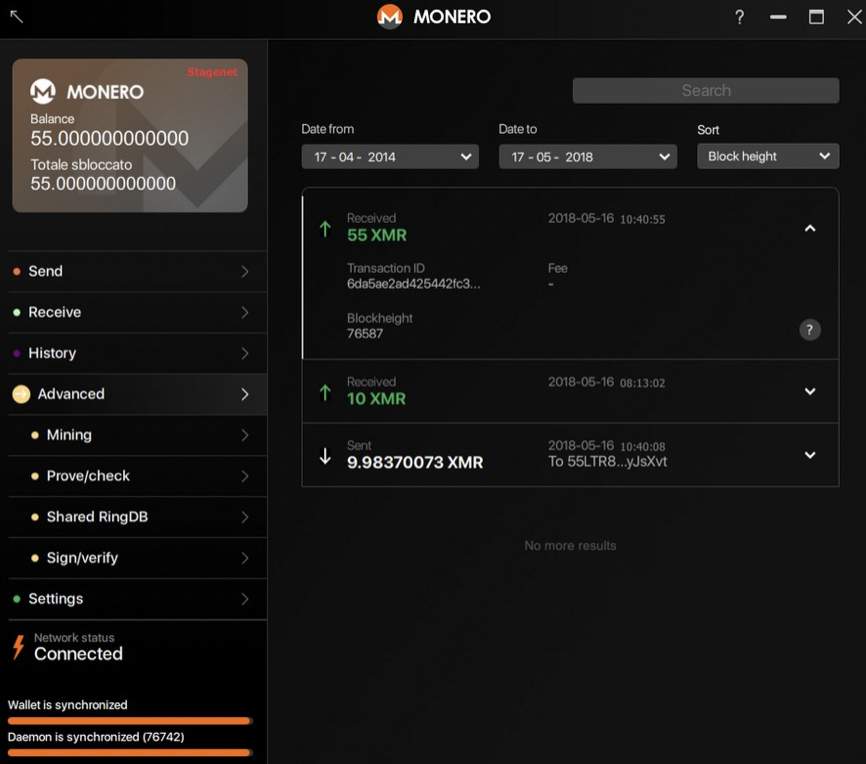
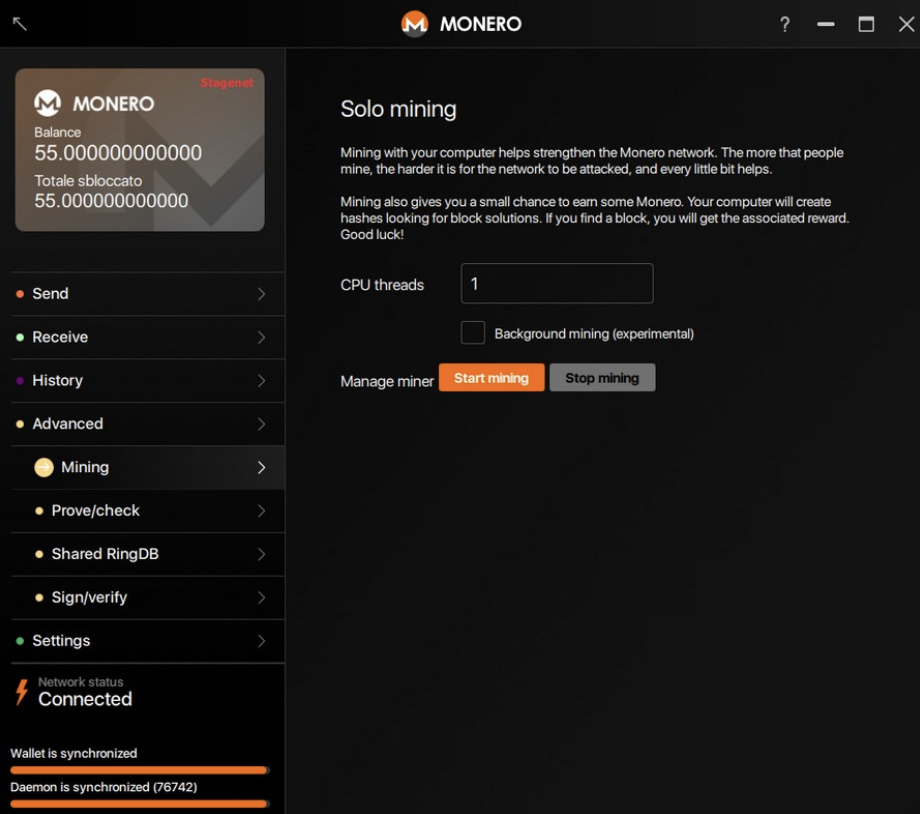
Solo mining can be done directly through the official Monero GUI wallet:

  1. Download the Monero GUI wallet from getmonero.org/downloads. Verify the download signature.
  2. Run the installer and allow the GUI to synchronize with the Monero network. Check the lower-left status indicator — it should show "Connected" before you proceed.
  3. Click the "Advanced" tab, then select "Mining."
  4. You can adjust the number of CPU threads. Starting with 1 is fine for testing; experienced miners typically leave 1–2 threads free for system tasks.
  5. Click "Start mining." Click "Stop mining" any time you want to pause.

Monero GUI solo mining setup — Advanced tab Mining section

Monero GUI start mining button — CPU threads configuration

Pool Mining: Step-by-Step

  1. Choose a mining pool. The community recommends p2pool for decentralization and zero fees. For centralized pools, check miningpoolstats.stream/monero and select one with less than 10% of total network hash rate. Consider pool fee, server location (closer = lower latency = better efficiency), minimum payout threshold, and uptime history.
  2. Configure XMRig. Open XMRig's config.json and set the pool address, your XMRWallet address as the username, and the number of CPU threads to allocate. The XMRig repository includes configuration examples and documentation.
  3. Run XMRig. When you see green confirmation messages that shares have been accepted, mining is active.
  4. Monitor your earnings through your pool's dashboard using your wallet address. Once you reach the pool's minimum payout threshold, XMR will be sent directly to your wallet.

Storing Your Mining Rewards

Configure your mining software to pay rewards directly to your XMRWallet address. Your earned XMR arrives under your direct, exclusive control from the first payment. XMRWallet requires no registration, stores no user data, and generates your private keys locally. It is entirely free to use.

Frequently Asked Questions

Can I mine Monero with a regular CPU in 2026?

Yes. Monero's RandomX algorithm is CPU-optimized and ASIC-resistant, making standard desktops and laptops viable mining hardware. For consistent payouts, join a pool — p2pool (zero fees, decentralized) is the community recommendation.

What is the difference between solo and pool mining?

Solo mining yields the full block reward but with very infrequent blocks for a single CPU — potentially months between payouts. Pool mining produces smaller but frequent, predictable payouts by combining hash rate across many miners. Most home miners use pool mining. Monero's recommended pool is p2pool.

What mining software should I use for Monero?

XMRig — available for Windows, Linux, and macOS from the official GitHub repository. Always download from the official source to avoid modified versions containing malware.

Sources & further reading:
Latest crypto news & tips

Updates, news and tips on investing in Monero (XMR), crypto and more!