

You’ve just bought Monero. What’s next? If you’ve been researching about Monero and cryptocurrency, you would’ve heard of storing your digital assets in crypto wallets for security. These wallets don’t hold actual coins like a real-life wallet holds your cash. Your crypto is on the blockchain. A crypto wallet is where you keep the keys, which allow you to access your digital money. If you lose your keys, you lose your crypto.
The most secure wallet is a paper wallet because it allows you to safeguard your XMR offline.
Here’s how to create a Monero paper wallet.
1. Download the Monero paper wallet generator . It will be in a zip file, which contains a public address, 25-word mnemonic seed, private spend key, and private view key.
- Public address is for receiving funds. You can give this to anyone who wants to send or pay you in XMR.
- Mnemonic seed is like a password to your wallet. You can use this for other wallets and for restoring your wallet.
- Private spend key is used to send XMR from your wallet.
- Private view key is used to view transactions.
2. getmonero.org recommends that you unzip the file offline.
3. Open the HTML file “monero-wallet-generator.” It will bring you to this page.
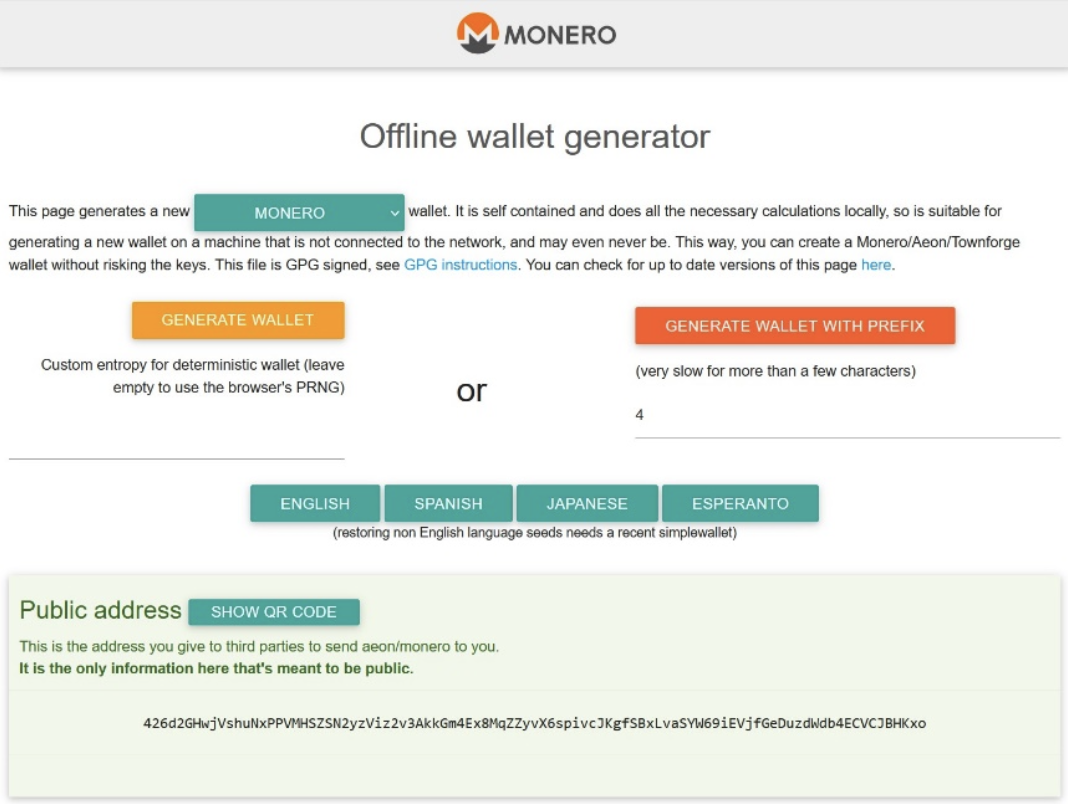
4. Click “GENERATE WALLET.” Scroll down after clicking and you’ll see this.
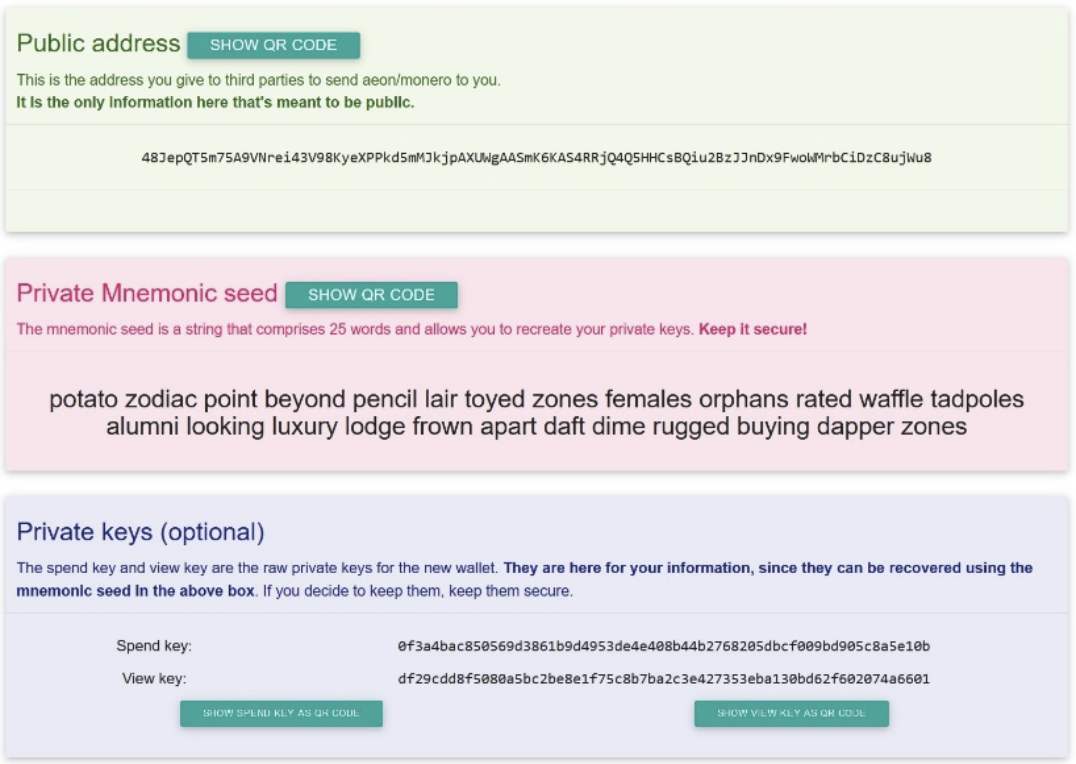
5. Write or print the information on paper. Make 3 copies and secure them in different locations. If you lose your paper wallet, you won’t be able to access your XMR or recover them. You have the option to use the QR code for ease, especially when sending your public address. Erase the printer memory after printing out your paper wallet. Don’t show it to anyone. They can memorize your mnemonic key or take a picture of your paper wallet without your permission.
6. You can also save it as a PDF or text file on a thumb drive or burn it on a CD or DVD. Make sure the files have a strong password if you intend to store them digitally.
7. You’re now ready to send your XMR to your paper wallet by using the public address. If you are copy-pasting, double check to confirm that it’s the right address. If you send the coins to the wrong address, there isn’t any way to get them back.
Pros and Cons of a Monero Paper Wallet
The biggest advantage of a paper wallet is your keys are safe from viruses or malware because they are offline. Hackers and scammers have no way of getting your funds, but you have the risk of losing or damaging your paper wallet. It’s vital that you keep your three copies in different safe places. You can put one in a fireproof safe and the rest in other secure locations. Just don’t forget where you stored them.
A major disadvantage of a Monero paper wallet is you can only use them to receive XMR. You can’t use it to send XMR or verify if the sent funds have arrived. You will need to set up a “View Only Wallet.” It’s an excellent way to store XMR, but inconvenient if you intend to use XMR regularly.
A simple way to send XMR, verify transactions, and use XMR is to make an account with a web or desktop wallet, such as XMRWallet. XMRWallet is an online Monero wallet that does not take a lot of space and processing power on your computer. XMRWallet doesn’t require you to register, provide an email address, or ask for information that can identify you. It’s non-custodial, so you hold your own keys and have sole access to your funds. As you use XMRWallet, your seed is never transmitted, received, or stored. The dashboard is very simple and user-friendly. Sending, receiving, and verifying transactions are so easy. XMRWallet has implemented Monero’s latest upgrade, and it’s absolutely free.
Importing your paper wallet is free as well and easy to do.
1. Go to xrnrwallet.com Login page.
- Make sure that your browser has the correct domain name (xrnrwallet.com) to avoid any phishing attacks.
2. Enter your seed in the space provided and click “ENTER MY ACCOUNT” using the mnemonic seed generated by your paper wallet. Synchronization will take about 15 minutes.
3. You are now ready to send, receive, and verify transactions with XMRWallet. The dashboard is straightforward, but you can find more details in using it in this blog article.
